
Random Color Generator (Pick a Random Color Instantly)

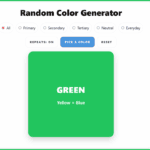
This random color generator lets you pick a color instantly, whether you need one color, three colors, or a quick palette for your next activity.
With a single click, you’ll get a bold color along with its name, making it easy to use as a simple color picker for art, classrooms, or quick decisions.
You can filter by color types, avoid repeats, and keep clicking to build your own combinations in seconds.
It’s a fast, no-fuss way to get a random color or create a quick color palette without overthinking it, just click the button below to pick a color.
Random Color Generator
Types of Colors You Can Generate
This random color generator includes 25 different colors, from basic primary shades to more everyday tones kids recognize. It’s a simple way to explore how colors are created while still using it as a quick color picker for activities.
Primary Colors
These are the starting point for all other colors. You can’t mix them to create anything new, which is why they’re often the first colors kids learn.
- Red
- Yellow
- Blue
Secondary Colors
These are made by mixing two primary colors together. If you’re using this as a color randomizer during art time, it’s fun to pause and try recreating the color with paints.
- Orange = Red + Yellow
- Green = Yellow + Blue
- Purple = Blue + Red
Tertiary Colors
These sit between primary and secondary colors on the color wheel and help kids see how colors gradually change.
- Red-Orange = Red + Orange
- Yellow-Orange = Yellow + Orange
- Yellow-Green = Yellow + Green
- Blue-Green = Blue + Green
- Blue-Purple = Blue + Purple
- Red-Purple = Red + Purple
Neutral Colors
These don’t appear on the rainbow but are some of the most useful colors in everyday life, especially in art and design.
- Brown = Mix of all three primaries (or Orange + Blue)
- Black = All colors mixed / absence of light
- White = Absence of pigment / all light combined
- Gray = Black + White
Common Everyday Colors
These are the colors kids tend to recognize straight away in toys, clothes, and nature. When you pick a random color from the generator, these often lead to the most fun activities.
- Pink = Red + White
- Light Blue (Sky Blue) = Blue + White
- Light Green (Lime) = Green + Yellow (or Green + White)
- Turquoise = Blue + Green
- Teal = Blue-Green + Black
- Peach = Orange + White
- Navy = Blue + Black
- Maroon = Red + Black
- Beige = Brown + White
- Olive = Green + Brown (or Green + Black)
Easy Ways to Use the Color Generator
Using a random color generator isn’t just for art time, it’s a really easy way to add a bit of structure or fun to everyday activities.
Start with a simple color of the day challenge by picking a random color each morning. Kids can wear that color, draw with it, or look for matching objects around the house or classroom, which works especially well for younger learners.
For art inspiration, use the color you pick as a starting point. If the generator lands on green, it might turn into a jungle scene, a frog, or even a full landscape. It takes away the “what should I draw?” problem straight away.
You can also use it for sorting and early learning. Pick a color and have kids group toys, crayons, or blocks that match. It’s a simple way to reinforce color recognition without needing any prep.
If you want to bring in a bit of literacy, try it as a creative writing prompt. Pick a random color and build a sentence or short story around it. Something like a purple dragon or a blue underwater world usually gets ideas flowing quickly.
It also works surprisingly well as a quick decision maker. Assign colors to kids or teams, then pick a random color to decide who goes first, who answers next, or which group leads the activity.
If you need more than one color, just keep clicking to build a palette. This is great for projects where kids need 2–5 colors and don’t want to overthink the choices.
If you want to build on this, try pairing your color with something from the random object generator to create ideas like a “green robot” or “orange castle,” which works especially well for creative writing and drawing prompts.
Free Printables to Pair With the Color Generator
Once you’ve picked a random color, these printables help turn it into a quick activity.
- Alphabet Coloring Pages (A–Z) – Kids can spin a color and use it to decorate their letter of the day.
- Color by Number Worksheets – Perfect match! Let the generator decide which color crayon to start with.
- Preschool Tracing Worksheets – Have kids trace letters, numbers, or shapes in the generated color.
- Color Purple Worksheet – A preschool-friendly printable with grapes, eggplants, balloons, and tracing practice to help kids recognize and explore the color purple.
- I Know My Colors Worksheet – Three interactive pages that teach preschoolers to match colors with real objects, crayons, and balloons while strengthening early vocabulary and motor skills.
- Colors Worksheets – Six preschool worksheets focusing on red, blue, green, yellow, orange, and pink. Each page includes a big color splat plus themed images (like fire trucks, frogs, or balloons) for easy recognition.
- My Favorite Color Worksheet – Lets kids express their preferences by coloring, drawing, and writing about their favorite color.
FAQ About the Random Color Generator
Yes. Each time you click, the generator uses a random calculation to display a color. It can’t be rigged or predicted, so kids always get a fair surprise.
We’ve included all the basics kids need to learn, primary, secondary, tertiary, neutral, and everyday colors. From Red and Blue to Peach, Navy, and Olive, the generator covers classroom standards and fun extras.
Absolutely! The tool works on desktop, tablet, or phone. Teachers often project it on a big screen, while homeschool parents use it on a tablet or laptop with younger learners.
Yes. The big color box and simple buttons make it kid-friendly. Preschoolers can click to spin for colors independently, while older children can use it to guide art projects or group activities.
Hex Code Reference
Once you’ve picked a random color, you can use the hex code below to recreate it in digital tools like Canva or design apps.
| Color | Formula | Hex Color Code |
|---|---|---|
| Red | Primary | #FF0000 |
| Yellow | Primary | #FFFF00 |
| Blue | Primary | #0000FF |
| Orange | Red + Yellow | #FFA500 |
| Green | Yellow + Blue | #008000 |
| Purple (Violet) | Blue + Red | #800080 |
| Red-Orange | Red + Orange | #FF4500 |
| Yellow-Orange | Yellow + Orange | #FFB733 |
| Yellow-Green | Yellow + Green | #9ACD32 |
| Blue-Green (Cyan/Teal) | Blue + Green | #20B2AA |
| Blue-Purple | Blue + Purple | #6A5ACD |
| Red-Purple (Magenta) | Red + Purple | #C71585 |
| Brown | Mix of primaries / Orange + Blue | #8B4513 |
| Black | All colors mixed / absence of light | #000000 |
| White | Absence of pigment / all light | #FFFFFF |
| Gray | Black + White | #808080 |
| Pink | Red + White | #FFC0CB |
| Light Blue (Sky Blue) | Blue + White | #87CEEB |
| Light Green (Lime) | Green + Yellow | #32CD32 |
| Turquoise | Blue + Green | #40E0D0 |
| Teal | Blue-Green + Black | #008080 |
| Peach | Orange + White | #FFDAB9 |
| Navy | Blue + Black | #000080 |
| Maroon | Red + Black | #800000 |
| Beige | Brown + White | #F5F5DC |
| Olive | Green + Brown (or Green + Black) | #808000 |
Last Updated on 20 April 2026 by Clare Brown
