
Word Maze Generator

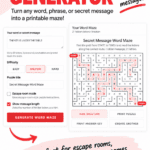
A word maze generator is a quick way to turn any word, phrase, or secret message into a custom maze.
Add your message, choose the difficulty, and the generator creates a printable puzzle with your letters hidden along the correct route from START to FINISH.
It’s especially useful for escape rooms, classroom activities, review games, or just creating a personalized puzzle without having to make the maze yourself.
Word Maze Generator
Turn any word, phrase, or secret message into a printable maze. Solve the maze from START to FINISH and read the letters along the correct path.
Your Word Maze
Secret Message Word Maze
Find the path from START to FINISH and read the letters along the correct route.
How to Use the Word Maze Generator
Start by entering the word, phrase, or secret message you want to hide in the maze. You can use up to 80 letters or numbers, so there’s plenty of room for anything from a single word to a longer clue.
Next, choose Easy, Medium, or Hard depending on how challenging you want the puzzle to be. You can also add your own puzzle title to make it fit the activity you’re creating.
If you’re using it for an escape room, select Escape room mode and the instructions will automatically tell players to solve the maze to reveal their next clue. You can also choose whether to show the number of letters in the hidden message as an extra hint.
Click Generate Word Maze and your puzzle will be created instantly. The hidden message appears along the correct route from START to FINISH, while the rest of the maze is filled with random letters to make the answer harder to spot.
You can check the completed route with Show Solution, print the puzzle on its own, or print an answer key with the solution highlighted. If you don’t like the first maze, just click Create Another to generate a different one using the same message.
Ideas for Using a Word Maze
One of my favorite ways to use a word maze is as part of an escape room. Instead of simply giving players their next clue, hide it in the maze so they have to find the correct route before they can move on.
They also work well for review activities. Hide a vocabulary word, historical figure, science term, book title, or answer to a question and have students solve the maze to discover what it is.
For younger students, keep the message short and use the Easy setting. Older students can tackle longer phrases on Medium or Hard, especially when the answer isn’t something they can guess before reaching the end.
You can also create personalized mazes for birthdays, treasure hunts, scavenger hunts, or rainy-day activities. Because you can enter your own message, the puzzle can be completely different every time.
Create an Escape Room Puzzle
This message maze generator is especially useful if you’re putting together your own escape room puzzles. Instead of writing the next clue on a card, enter it into the word maze and make solving the puzzle part of the game.
The hidden message could reveal a location, a password, a number to use in a combination, or an instruction such as LOOK UNDER THE DESK or CHECK THE BOOKSHELF.
Turn on Escape room mode before generating the maze and the puzzle instructions will tell players that solving the correct route reveals their next clue. For a harder challenge, switch off the message-length hint so they won’t know how long the answer should be.
You can print the answer key separately too, which makes it easy to check the solution without giving anything away to the players.
More Word and Puzzle Generators
If you enjoy creating your own puzzles, there are a few other puzzle generators you can use for quick activities.
For another secret-message challenge, try our Morse code generator. Enter your own message, convert it into Morse code, play the code as sound, or turn it into a printable puzzle.
Our random word generator is useful when you need a word for a writing activity, game, or challenge, while the writing prompt generator gives you a starting point for a longer creative writing activity.
For something you can play as a group, try the Scattergories generator for an instant letter and category challenge.
