Free Worksheet Generators for Kids

These free worksheet generators are what I use when I need a quick activity but don’t want to spend ages creating something from scratch.
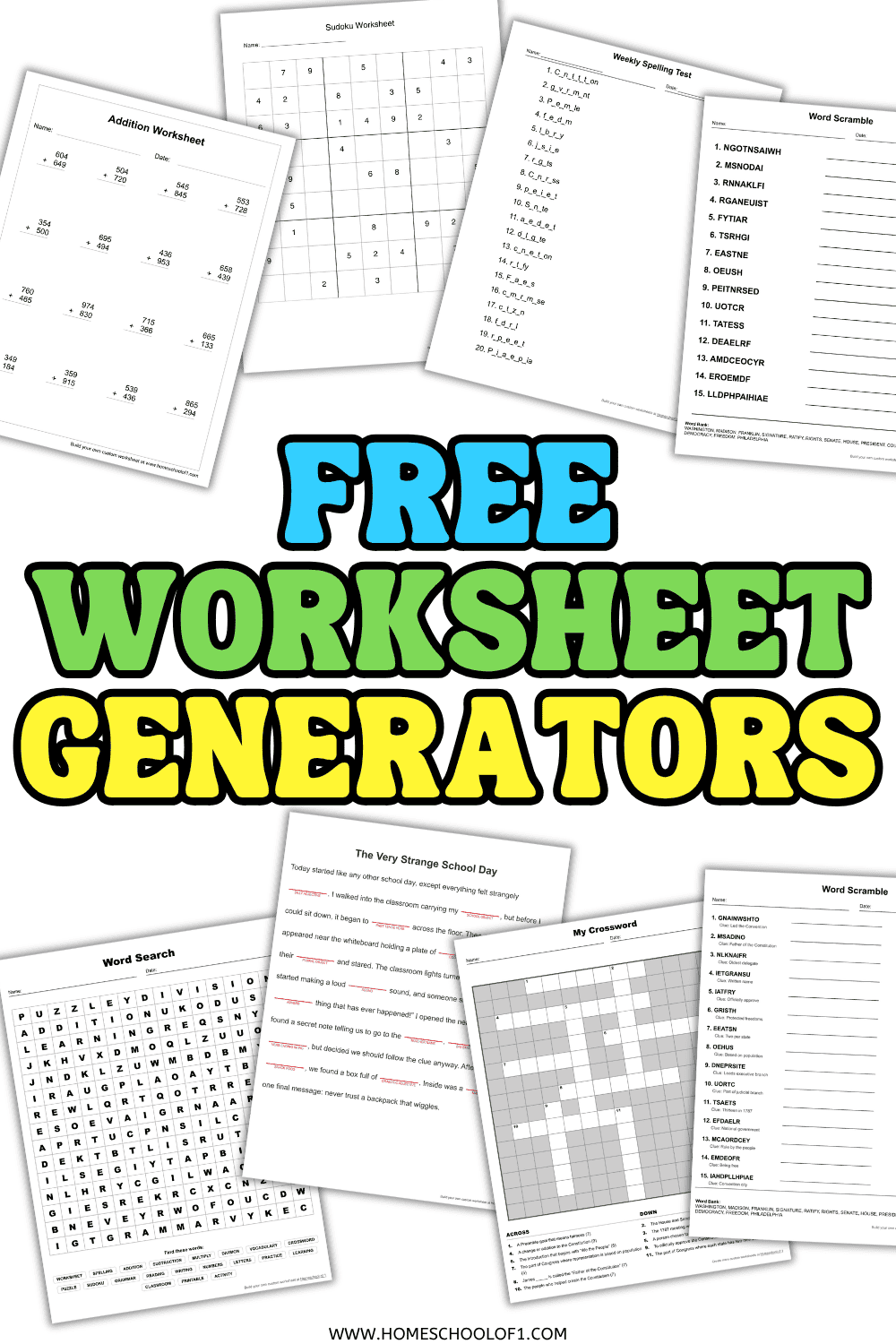
You can make your own math worksheets, spelling tests, word searches, crosswords, word scrambles, and more, choosing the words or settings to suit what you’re working on.
I’ve kept all of the generators simple. Pick what you need, change the options, and you’ve got a printable worksheet ready to use.
There are currently generators for addition, subtraction, multiplication, division, spelling, word searches, crosswords, word scrambles, Sudoku, and Mad Libs, and I’ll be adding more.
Create your own printable worksheets
Rather than searching for a worksheet that fits what you’re teaching, these generators let you create exactly what you need.
Some let you add your own spelling or vocabulary words, while others let you choose the type and difficulty of the questions.
Word search generator
My Word Search Generator lets you turn any list of words into a customized printable word search.
Choose from 10×10, 15×15, or 20×20 grids and decide whether you want to allow diagonal and backward words. This makes it easy to adjust the difficulty depending on the age of your students.
I particularly like using word searches for introducing or reviewing vocabulary because you aren’t limited to a particular subject. Add science terms, historical figures, spelling words, seasonal vocabulary, or whatever you’re currently teaching.
Crossword generator
Use the Crossword Generator when you want students to do a little more than simply find vocabulary words.
Add your own answers and clues and the tool creates a customized crossword puzzle. It’s useful for reviewing definitions, facts, people, places, and subject-specific vocabulary.
You can use it for almost any subject, which makes it particularly handy for end-of-unit review.
Word scramble generator
The Word Scramble Generator turns your own word list into a printable scrambled-word activity.
You can create the puzzle with or without clues, and an answer sheet is included so you don’t have to unscramble everything yourself afterward.
It’s an easy option for spelling practice, vocabulary review, or creating a quick activity around a particular theme.
Spelling test generator
My Spelling Test Generator is designed for those weeks when you already have the spelling words but still need something useful to do with them.
Add your own word list and create a printable spelling activity using the available formats, including dictation and missing-letter practice.
Because you choose the words yourself, you can use it with your regular spelling curriculum, classroom word list, vocabulary unit, or words a child needs some extra practice with.
Mad Libs generator for kids
For something less worksheet-like, the Mad Libs Generator combines grammar practice with a game.
Kids choose different parts of speech before seeing how their answers fit into the finished story. It’s a much more entertaining way to reinforce nouns, verbs, adjectives, and other grammar concepts.
It’s also a good one to pull out when you want an educational activity that doesn’t particularly feel like schoolwork.
Sudoku generator
The Sudoku Generator creates printable number puzzles for logic and problem-solving practice.
Sudoku doesn’t require any arithmetic, despite all the numbers. Instead, kids need to use reasoning and elimination to work out which number belongs in each space.
You can generate a new puzzle whenever you need one, making this a useful option for early finishers, quiet time, or an occasional break from regular lessons.
Free math worksheet generators
For straightforward math practice, these math worksheet generators let you create new sets of problems based on the operation and settings you choose.
They’re particularly useful when a student needs more practice with one skill but you don’t want to hunt around for another worksheet that happens to be at the right level.
Addition worksheet generator
Use the Addition Worksheet Generator to create customized addition practice.
Choose the settings that suit the level you’re working on and generate a fresh set of addition problems whenever you need them.
It’s useful for regular math practice, warm-ups, homework, or extra work on addition fluency.
Subtraction worksheet generator
The Subtraction Worksheet Generator creates printable subtraction problems based on the options you select.
You can use it for targeted practice rather than giving students pages of questions that are either too easy or unnecessarily difficult.
Multiplication worksheet generator
My Multiplication Worksheet Generator makes it easy to create extra multiplication practice without relying on the same worksheet repeatedly.
Use it for multiplication facts, times table practice, math warm-ups, or extra review when particular facts aren’t quite sticking yet.
Because you can generate new questions, it’s also useful when you want students to practice the same skill more than once.
Division worksheet generator
The Division Worksheet Generator creates customized division practice using the settings you choose.
It’s useful for reinforcing division skills, providing additional practice, or creating a quick math activity without putting together a worksheet manually.
How to create your own worksheets
All of the generators work slightly differently, but I’ve deliberately kept them simple.
- Choose the worksheet generator you want to use.
- Add your own words or choose the available settings.
- Adjust the difficulty or options where available.
- Generate your activity.
- Print the finished worksheet and use it straight away.
You can come back and create another version whenever you need one, which is particularly useful when students need repeated practice without seeing exactly the same questions each time.
Ways to use worksheet generators
The biggest advantage of creating your own worksheets is flexibility. You aren’t restricted to the vocabulary, questions, or difficulty level someone else has chosen.
I use generators when I need something specific without wanting to spend half an hour making it myself.
They can work particularly well for:
- Morning work
- Weekly spelling practice
- Math warm-ups
- Vocabulary review
- Early finishers
- Homework
- Test preparation
- Extra practice
- Substitute teacher activities
- Seasonal or themed lessons
For vocabulary-heavy subjects such as science and history, you can also use the same word list across several generators. A set of vocabulary words could become a word search one day, a word scramble the next, and a crossword for review later in the week.
Which worksheet generator should I use?
| If you need… | Try this generator |
|---|---|
| Addition practice | Addition Worksheet Generator |
| Subtraction practice | Subtraction Worksheet Generator |
| Times tables or multiplication practice | Multiplication Worksheet Generator |
| Division practice | Division Worksheet Generator |
| Weekly spelling practice | Spelling Test Generator |
| Vocabulary practice | Word Search Generator |
| Definitions and review questions | Crossword Generator |
| A quick vocabulary game | Word Scramble Generator |
| Grammar and parts of speech | Mad Libs Generator |
| Logic and problem-solving | Sudoku Generator |
There isn’t really a right way to use them. The point is to create something that fits what you’re teaching rather than changing your lesson to fit a worksheet you’ve found.
More free educational tools
If you’d rather use ready-made activities, browse our free printable worksheets for homeschooling across different subjects and grade levels.
You’ll also find random generators, classroom games, calculators, and other interactive resources that can help with lessons, activities, and those occasions when you just need a quick way to choose something at random.
Explore all of my free online educational tools to see what else you can use.
